















RealtimeChat · Projects · Pipeline · Help desk — for every kind of team

Talk it.Track it.Close it.

Zoabase puts your team chat, your project boards, your pipeline and your help desk in one tab — whether you run a studio, a school, a clinic, a software team or a charity. The message, the task it creates and the person it’s for never lose each other.

Free for up to 5 people · No card needed · Ready in a minute

# proj-greenleaf-film Northwind Studio live
Rohan

Rohan 09:12

Rough-cut review is booked for tomorrow 11:00. GBF-9 is the one to watch.
Message #proj-greenleaf-film
Agencies & studios Software & SaaS Schools Colleges & institutes Clinics & hospitals Real estate Nonprofits & NGOs Law firms Hotels & restaurants Retail & e-commerce Manufacturers Logistics & transport Consulting & accounting Construction & architecture Finance & insurance Clubs, gyms & communities

Built for every kind of organization

Your organization. Your words.

Every team talks, tracks work, wins people over and answers questions. Zoabase gives you those four rooms and lets you name everything in them — so it reads like it was built for your school, clinic, firm or charity.

  • Chat & huddles

    Channels for every team, class, ward, site or project — with calls one click away.

  • Projects & boards

    Any piece of work with steps: a sprint, a term, a branch opening, a fundraiser.

  • Pipeline

    Whoever you’re winning over — clients, families, patients, buyers, donors, members.

  • Help desk

    Questions and requests from customers, parents, tenants or guests, answered on time.

The same four rooms, in each organization’s own words

  • 01

    Agencies & studios

    Winning over brands and clients

    Pipeline

    1. Brief
    2. Proposal
    3. Signed

    BoardCampaign launch

    Help deskClient requests

  • 02

    Software & SaaS

    Winning over trials and accounts

    Pipeline

    1. Discovery
    2. Trial
    3. Closed won

    BoardSprint board

    Help deskBug reports

  • 03

    Schools

    Winning over families choosing a school

    Pipeline

    1. Enquiry
    2. Campus visit
    3. Enrolled

    BoardTerm planning

    Help deskParent help desk

  • 04

    Colleges & institutes

    Winning over students and sponsors

    Pipeline

    1. Enquiry
    2. Demo class
    3. Admitted

    BoardCourse calendar

    Help deskStudent help desk

  • 05

    Clinics & hospitals

    Winning over patients and referrers

    Pipeline

    1. Referral
    2. Consult
    3. Treatment plan

    BoardNew branch opening

    Help deskPatient help desk

  • 06

    Real estate

    Winning over buyers, sellers and tenants

    Pipeline

    1. Viewing
    2. Offer
    3. Keys handed

    BoardListings

    Help deskTenant services

  • 07

    Nonprofits & NGOs

    Winning over donors and volunteers

    Pipeline

    1. Contacted
    2. Pledged
    3. Received

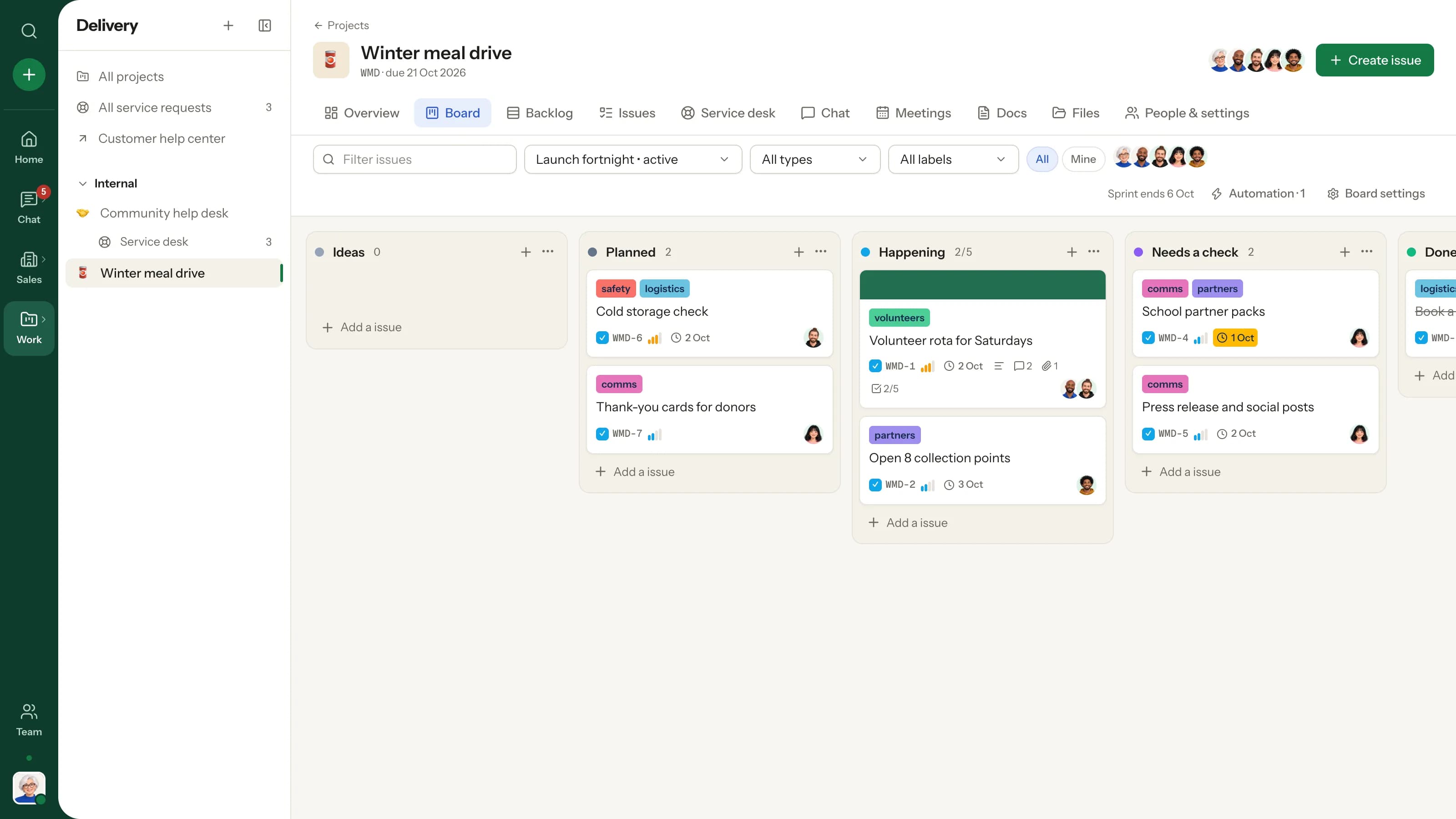
    BoardMeal drive

    Help deskCommunity help desk

  • 08

    Law firms

    Winning over prospective clients

    Pipeline

    1. Consultation
    2. Engagement
    3. Retained

    BoardCase files

    Help deskClient portal

  • 09

    Hotels & restaurants

    Winning over guests, groups and events

    Pipeline

    1. Enquiry
    2. Quote
    3. Booked

    BoardEvent set-ups

    Help deskGuest requests

  • 10

    Retail & e-commerce

    Winning over wholesale buyers

    Pipeline

    1. Sample sent
    2. First order
    3. Repeat

    BoardStore launches

    Help deskOrder support

  • 11

    Manufacturers

    Winning over distributors and oems

    Pipeline

    1. RFQ
    2. Quote
    3. PO received

    BoardProduction runs

    Help deskWarranty claims

  • 12

    Logistics & transport

    Winning over shippers and partners

    Pipeline

    1. Lane quote
    2. Trial load
    3. Contract

    BoardFleet maintenance

    Help deskShipment issues

  • 13

    Consulting & accounting

    Winning over clients

    Pipeline

    1. Intro call
    2. Proposal
    3. Engaged

    BoardMonth-end close

    Help deskClient questions

  • 14

    Construction & architecture

    Winning over developers and homeowners

    Pipeline

    1. Site visit
    2. Estimate
    3. Contract

    BoardSite progress

    Help deskSnag reports

  • 15

    Finance & insurance

    Winning over policyholders and investors

    Pipeline

    1. Needs call
    2. Quote
    3. Policy issued

    BoardCompliance review

    Help deskClaims desk

  • 16

    Clubs, gyms & communities

    Winning over members and sponsors

    Pipeline

    1. Trial visit
    2. Joined
    3. Renewed

    BoardSeason schedule

    Help deskMember help

Don’t see yours? If your team talks, plans work, wins people over and answers questions, Zoabase fits — rename columns, stages and request types in settings, no consultant needed.

See how

The workspace that works the way you do

Four jobs, one tab. Each part is useful on its own — and they’re better together, because the lead, the project, the channel and the ticket all know about each other.

Chat & huddles

A room for every conversation. A door you open in one click.

Channels, DMs and threads keep talk where it belongs. When typing gets slow, hit Huddle — voice, video and screen share start right there in the channel. No link to paste, no app to switch to.

  • Threads, reactions, pins & mentions
  • Voice notes, screen clips and big file uploads
  • Scheduled messages & save for later
How it works
Huddle# proj-mobile-3 04:12
TomTomSCREEN
MeiMei
AishaAisha
Mei
Mei in thread

That sync badge is the one

3 2

As used at Lumen Labs, a software company

Projects, boards & sprints

Cards that know where they’re going.

Every project gets a key, a channel, a board and a backlog. Name columns the way you actually work — Code review for developers, Waiting for approval at a school, Client review at a studio — and let automations assign, date and comment the moment a card lands.

  • Epics, sub-tasks, story points & history
  • Checklists, covers, attachments, WIP limits
  • Sprints with carry-over on completion
How it works

Science fair — fair week

3 days left

Goal: everything ready for Friday’s fair

  • SCI-2Book the main hallBrian
  • SCI-3Confirm three judgesAmara
  • SCI-1Project registrationsAmara
  • SCI-8Judging rubricPeter
Moved to Waiting for approval → assigned Grace

As used at Brightpath Academy, a school

Leads & pipeline

Every lead remembers every conversation.

A lead is whoever you’re winning over — a client, a family choosing a school, a buyer, a donor. Each holds unlimited contacts with every way to reach them; notes, voice notes and files live in its own chat, and reminders tap you on the shoulder right on time.

  • A pipeline with stages in your words
  • Email, WhatsApp, LinkedIn & 10 more channels
  • Tasks, reminders & a live activity feed
How it works

Pennine Community Foundation

Grant · Considering · 70% likely

£45k

Ruth

Ruth Ellis

Grants manager · primary contact

[email protected]WAWhatsAppinLinkedInpennine.example

Note · Panel meets on the 14th. They loved the school partnership story.

Voice note · 0:42 · Jasmine

Send Ruth the volunteer numbers

Pennine Community Foundation · due now

DoneSnooze 1hTomorrow

As used at Harbor Food Trust, a nonprofit

Service desk & help center

Support with a front door and a back office.

Customers, parents, patients or tenants open requests from your help center; your team works them with replies, private notes, workflows and response targets. When it needs real work, escalate it onto a project board in one click.

  • Request types and forms you design
  • Workflows, queues, routing & quick replies
  • Public, signed-in or customers-only desks
How it works

Help center · CarePoint patient help desk

Payment link fails for my co-pay

Billing or payment problem · opened by Rohit

  1. Received
  2. Being worked onKavya picked it up · escalated to PAT-1
  3. Waiting for your reply
  4. Resolved
SUP-56 first response in 12 min · target 4h
“Sorted within the hour, thank you!”

As used at CarePoint Clinics, a clinic

Docs & artifacts

Two cursors, one brief, zero “which version?”

Realtime docs that live next to the project or channel — briefs, lesson plans, launch plans, SOPs — with comments, version history and publishing to your help center.

Palm Grove — launch planChloeSofia

Launch day

• 10:00 Doors open at the villaChloe

• 11:00 Private viewings for buyersSofia

Saved · version 12 2 comments
Meetings

A meeting that remembers what it decided.

Stand-ups, staff meetings, client reviews, grant panels: agenda, RSVPs, a reminder ten minutes before, a built-in call, shared notes and follow-ups — plus .ics and Google Calendar export.

Thu

11

11:00

Rough cut review with GreenLeaf

45 min · GBF · agenda, notes & follow-ups

Priya GoingArjun GoingMaya Maybe
Join call .ics

And the small things that make a day smoother

  • ⌘K anywhere

    Jump to any channel, person, project or issue.

  • Search operators

    from:@priya in:#sales has:file is:pinned

  • Reminders

    On leads, contacts or any message — with snooze.

  • Voice & clips

    Record audio, camera or screen right in the composer.

  • Do Not Disturb

    Pings are kept, not pushed, until you’re back.

  • Live everywhere

    Every list, board and badge updates as it happens.

Go on — drag them around.

Communicate · Customers · Delivery

One home for every team — and everyone you serve.

Teachers and admissions, nurses and the front desk, developers and sales — each team gets its channels, boards and desk, and every client, family, patient or donor keeps their whole story in one place.

See how it’s organised

Pricing

Pay for people and space. Not features.

Every plan gets chat, huddles, boards, the pipeline and the help center. One price per workspace — no per-seat maths.

Starter

For a founder and a few friends finding their rhythm.

$0free forever

People
5
Storage
2 GB
Per file
25 MB
  • Up to 5 team members
  • 2 GB of file storage
  • Files up to 25 MB
  • Create 1 workspace, join as many as you're invited to
  • Every feature, including huddles and the help center
Start free
Most teams pick this

Team

For studios, schools, clinics and growing teams doing real work.

$29per workspace / month

People
25
Storage
100 GB
Per file
1 GB
  • Up to 25 team members
  • 100 GB of file storage
  • Files up to 1 GB — videos and scans fit
  • Create up to 3 workspaces
  • Every feature, including huddles and the help center
Start with Team

Business

For growing companies with several teams under one roof.

$99per workspace / month

People
100
Storage
1 TB
Per file
5 GB
  • Up to 100 team members
  • 1 TB of file storage
  • Files up to 5 GB
  • Create up to 10 workspaces
  • Every feature, plus priority support
Start with Business

Prices in US dollars. Compare plans in detail

Made for every role

One room. Everyone in it.

Every organization has the same cast: someone who runs it, someone who plans, someone who makes, someone who sells, someone who helps — and the people you serve. Here they are at one team, Northwind Studio. Tap anyone to see their corner of Zoabase, and who they’d be elsewhere.

Farah · Atlas help center
Map pins overlap on the listings page in Safari.

Farah Khan

Farah Khan

Client · Atlas Realty

“I report a problem once and watch it get fixed — no chasing emails.”

Checking her request in the help center

Their corner of Zoabase

  • Her own requests page
  • Public, signed-in or invite-only desks
  • Never counted as a seat

Elsewhere: a parent at a school, a patient at a clinic, a tenant at an estate agency.

Opens first: /help/northwind-studio

Good questions

Frequently asked

What exactly is Zoabase?+

One workspace for your whole team: Slack-style channels, DMs, threads and huddles; projects with boards, backlogs and sprints; a pipeline for the people you’re winning over; and a help desk with a public help center. Everything updates live.

Is it only for agencies and studios?+

Not at all. Schools run admissions and a parent help desk in it, clinics plan new branches and answer patients, software teams run sprints and support, estate agencies track buyers and tenants, and nonprofits manage volunteers and donors. You rename board columns, pipeline stages and help-desk request types to match — no setup project, no consultant.

Is there anything to install?+

No. Create a workspace, invite your team and start working in the browser. We run the servers, updates and backups — you never touch a database.

Who can see our data?+

Only your workspace. Every workspace is walled off from every other one: people, messages, files and customers are private to your team, and your help center only shows what you publish.

What’s the difference between the plans?+

Every plan has every feature. Starter is free for up to 5 people with 2 GB of storage; Team ($29/month) covers 25 people and 100 GB; Business ($99/month) covers 100 people and 1 TB. You pay per workspace, not per seat.

Do our customers count as members?+

No. Customers who use your help center get their own accounts and never count towards your plan. Only people on your team do.

What happens when we outgrow a plan?+

Zoabase tells you before anything breaks. You can upgrade in a click from Workspace settings, switch between monthly and yearly, or move down again whenever your team and files fit the smaller plan.

Bring your whole team under one calm roof.

Create your workspace in a minute, name things your way, invite the team — and move one project over this afternoon.

Harbor Food Trust’s winter meal drive board